 Victor Gorchilov
52c2611e9d
Victor Gorchilov
52c2611e9d
* [up] add config for custom images, better js

* [up] use bundler to bundle js

* [fix] remove domcontentloaded since defer is used

* [fix] formatting with black

* [fix] images drf api

* [up] add support for custom icons on additional roles: power panel, power feed, circuit

* [up] optimize topology generation by using `_id` when trying to access pk of related object

* [fix] kebab case instead of slugification

* [fix] use empty queryset in api views & change coord save logic
6.5 KiB
Netbox Topology Views Plugin


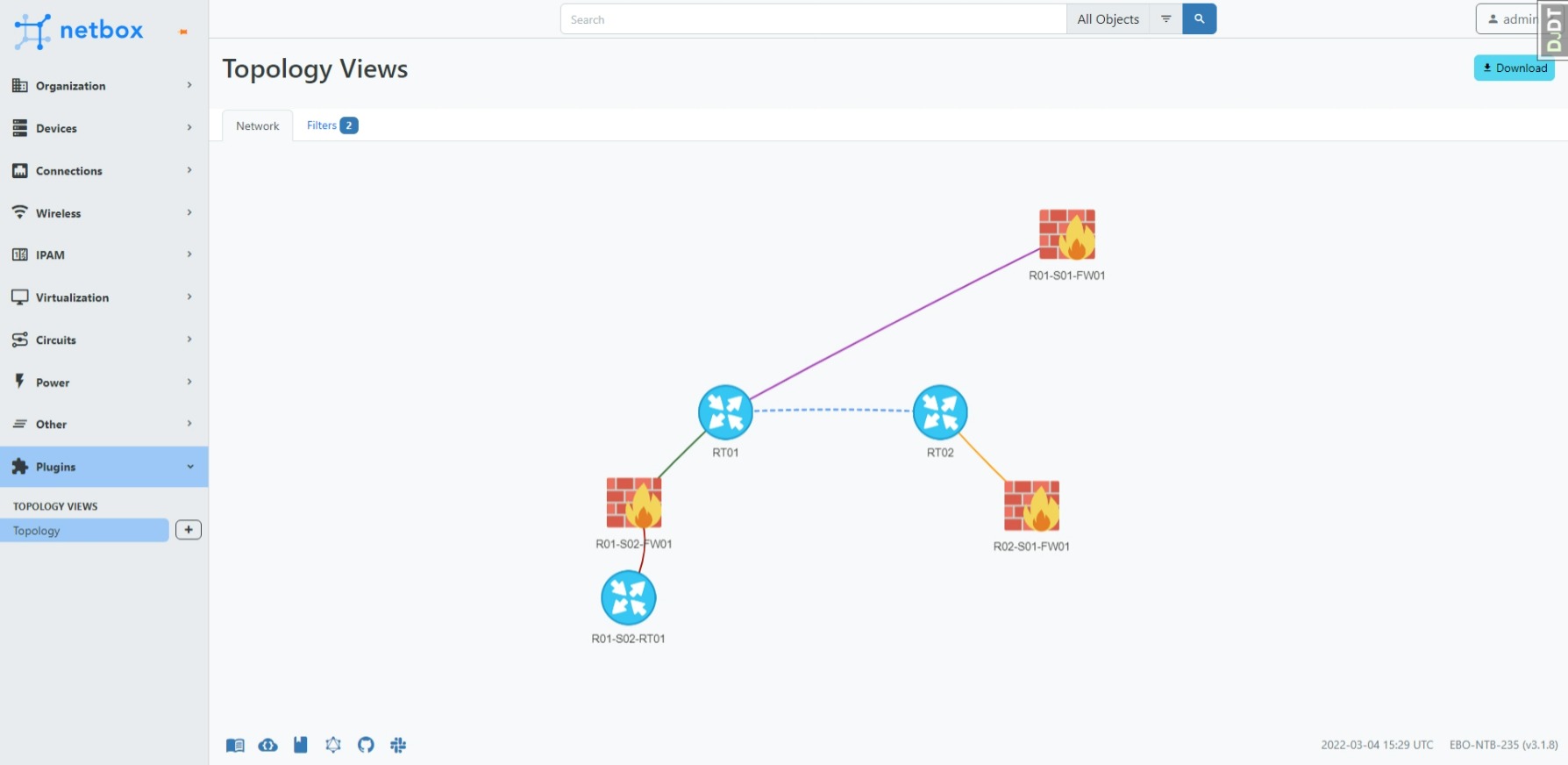
Create topology views/maps from your devices in netbox. The connections are based on the cables you created in netbox. Support to filter on name, site, tag and device role.
Preview
Install
The plugin is available as a Python package and can be installed with pip.
Run pip install netbox-topology-views in your virtual env.
To ensure NetBox Topology Views plugin is automatically re-installed during future upgrades, create a file named local_requirements.txt (if not already existing) in the NetBox root directory (alongside requirements.txt) and list the netbox-topology-views package:
# echo netbox-topology-views >> local_requirements.txt
Once installed, the plugin needs to be enabled in your configuration.py
# In your configuration.py
PLUGINS = ["netbox_topology_views"]
First run source /opt/netbox/venv/bin/activate to enter the Python virtual environment.
Then run
cd /opt/netbox/netbox
pip3 install netbox-topology-views
python3 manage.py migrate netbox_topology_views
python3 manage.py collectstatic --no-input
Versions
| netbox version | netbox-topology-views version |
|---|---|
| >= 3.3.0 | >= v3.0.0 |
| >= 3.2.0 | >= v1.1.0 |
| >= 3.1.8 | >= v1.0.0 |
| >= 2.11.1 | >= v0.5.3 |
| >= 2.10.0 | >= v0.5.0 |
| < 2.10.0 | =< v0.4.10 |
Custom field: coordinates
There is also support for custom fields.
If you create a custom field "coordinates" for "dcim > device" and "Circuits > circuit" with type "text" and name "coordinates" you will see the same layout every time. It is recommended to set this field to "UI visibility" "Hidden" and let the plugin manage it in the background.
The coordinates are stored as: "X;Y".
Please read the "Configure" chapter to set the allow_coordinates_saving option to True.
You might also set the always_save_coordinates option to True.
Configure
If you want to override the default values configure the PLUGINS_CONFIG in your netbox configuration.py.
Example:
PLUGINS_CONFIG = {
    'netbox_topology_views': {
        'preselected_device_roles': ['Router', 'Firewall'],
        'enable_circuit_terminations': True
    }
}
| Setting | Default value | Description |
|---|---|---|
| static_image_directory | netbox_topology_views/img | (str or pathlib.Path) Specifies the location that images will be loaded from by default. Must be within STATIC_ROOT |
| preselected_device_roles | ['Firewall', 'Router', 'Distribution Switch', 'Core Switch', 'Internal Switch', 'Access Switch', 'Server', 'Storage', 'Backup', 'Wireless AP'] | The full name of the device roles you want to pre select in the global view. Note that this is case sensitive |
| allow_coordinates_saving | False | (bool) Set to true if you use the custom coordinates fields and want to save the coordinates |
| always_save_coordinates | False | (bool) Set if you want to enable the option to save coordinates by default |
| ignore_cable_type | [] | The cable types that you want to ignore in the views |
| preselected_tags | [] | The name of tags you want to preload |
| draw_default_layout | False | (bool) Set to True if you want to load draw the topology on the initial load (when you go to the topology plugin page) |
Custom Images
To change image with associated device use the Images page - it allows to map a device role with an image found in the netbox static directory (defined by the plugin config static_image_directory which defaults to netbox_topology_views/img). You can also upload you own custom images to there - these images will automatically be used for a device (if it does not already have a specified image in the settings) if their name is the device role slug.
Use
Go to the plugins tab in the navbar and click topology or go to $NETBOX_URL/plugins/netbox_topology_views/ to view your topologies
Update
Run pip install netbox-topology-views --upgrade in your venv.
Run python3 manage.py migrate netbox_topology_views
Run python3 manage.py collectstatic --no-input
Clear you browser cache.
Permissions
To view /plugins/topology-views/ you need the following permissions:
- dcim | device | can view device
- dcim | site | can view site
- extras | tag | can view tag
- dcim | device role | can view device role
Icons info
Power icons created by Freepik - Flaticon.
Power icons created by Flat Icons - Flaticon
Provider icons created by Good Ware - Flaticon