# Predator Control
An open-source **PredatorSense replacement for Linux**, built for the
**Acer Predator Helios 16 (PH16-71)** and tested on CachyOS with KDE Plasma 6.
It gives you everything the Windows control center does – performance modes,
fan control, per-key keyboard RGB, the rear lightbar and battery health – as a
desktop app, a **Plasma panel widget**, and a command line tool.
## Features
| Area | What you get |
|------|--------------|
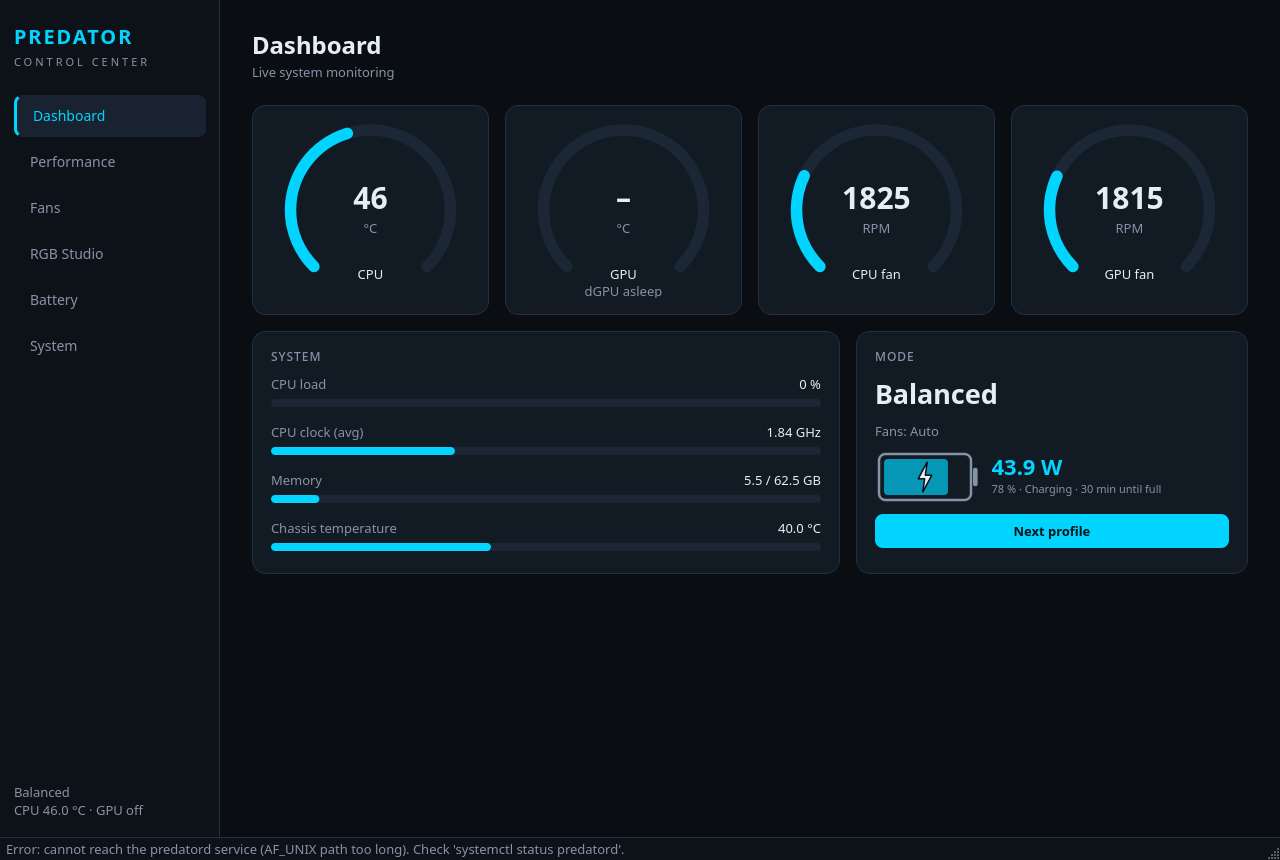
| **Performance** | Eco / Quiet / Balanced / Performance / Turbo (ACPI platform profiles), separate profiles for AC and battery with automatic switching when you plug in or unplug |
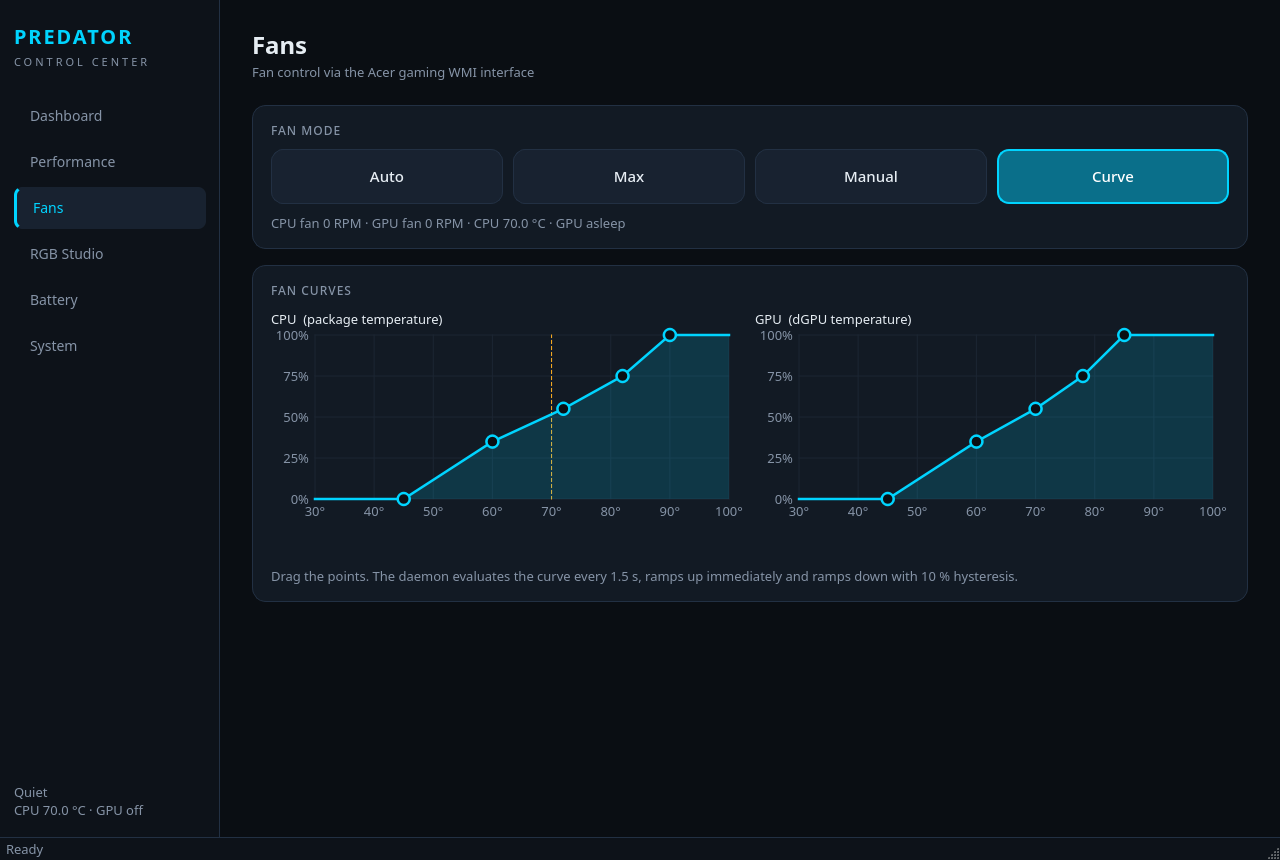
| **Fans** | Auto, Max (cooler boost), manual speed per fan, or a **custom temperature curve** for CPU and GPU with drag-and-drop editor |
| **Keyboard RGB** | 12 hardware effects (static, breathing, rainbow wave, ripple, neon, rain, explosion, pulse, stars, meteor, aura, …), colour, brightness, hidden effect variants, presets |
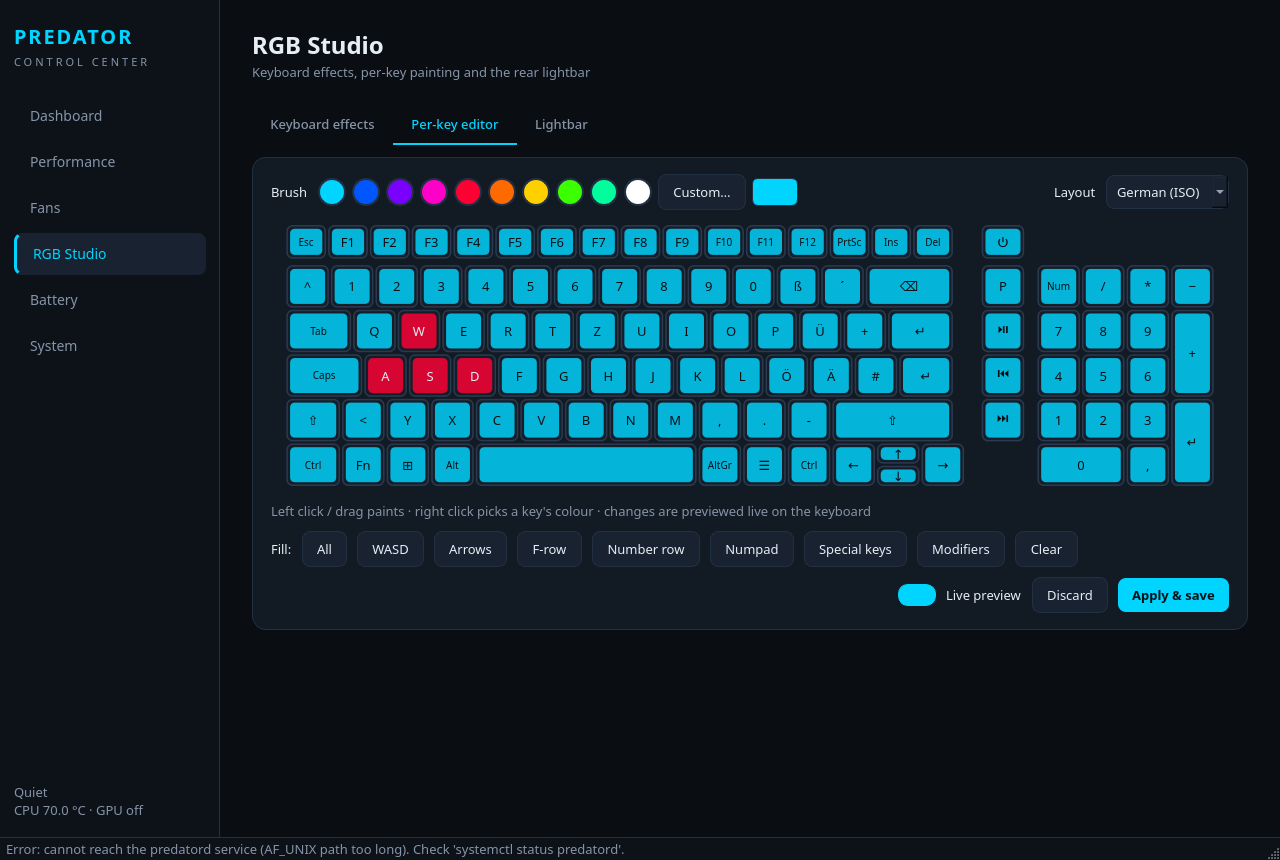
| **RGB Studio** | Paint individual keys with the mouse, live preview on the keyboard, quick fills (WASD, arrows, F-row, numpad …), German ISO and US ANSI layouts |
| **Lightbar** | All rear lightbar effects with colour, brightness and speed – or let it follow the keyboard |
| **Battery** | live charging indicator in watts with power graph and time until full / remaining, 80 % charge limit, calibration, health and cycles |
| **Firmware options** | Boot animation & sound, LCD overdrive, keyboard backlight timeout, USB charging while off |
| **Monitoring** | CPU/GPU temperatures, fan RPM, CPU load and clock, memory – without waking the dGPU |
| **Panel widget** | Click the icon in the Plasma panel to change everything quickly; buttons open the full app directly on the right page (e.g. RGB Studio). Middle-click cycles the performance mode |
| **Persistence** | All settings are restored at boot and after suspend/resume |
## Supported hardware
| Model | Keyboard MCU | Status |
|-------|--------------|--------|
| Acer Predator Helios 16 **PH16-71** | Chicony `04F2:011A` / `04F2:0117` | primary target |
Other Predator/Helios models with the same keyboard controller and WMI
interfaces will likely work. Reports are welcome – please include the output of
`predatorctl status`, `lsusb | grep 04f2` and `cat /sys/class/dmi/id/product_name`.
## Installation
### pacman package (Arch, CachyOS, Manjaro, EndeavourOS …) – recommended
Download `predator-control--any.pkg.tar.zst` from the
[releases page](https://git.mrblake.cc/MrBlake/Cachy-Predator-Keyboard/releases) and install it:
```bash
sudo pacman -S --needed linux-cachyos-headers clang lld llvm # headers for your kernel (stock Arch: linux-headers)
sudo pacman -U predator-control-1.1.0-1-any.pkg.tar.zst
```
The service starts automatically and the kernel module is built by DKMS for every installed kernel.
To build the package yourself: `cd packaging/arch && makepkg -f`.
> Switching from `install.sh` to the package? Run `sudo ./uninstall.sh` first (your settings are kept).
### Install script (any distribution)
Requirements: a kernel with `acer-wmi` (any recent kernel), Python 3, PySide6,
DKMS and kernel headers. On Arch / CachyOS / Manjaro the installer pulls in everything.
```bash
git clone https://git.mrblake.cc/MrBlake/Cachy-Predator-Keyboard.git
cd Cachy-Predator-Keyboard
sudo ./install.sh
```
Then:
* **App:** start *Predator Control* from the application menu, or run `predator-control`
* **Panel widget:** right-click the panel → *Add or Manage Widgets…* → search for *Predator Control*
and drag it into the panel – or enable it under *System Tray Settings → Entries*.
If it does not show up yet, log out and back in.
* **CLI:** `predatorctl status`
On other distributions install the dependencies yourself and run `sudo ./install.sh --no-deps`.
**Secure Boot:** the kernel module is unsigned. With Secure Boot enforcing module
signatures you have to sign `predator_wmi` yourself (e.g. with `sbctl` or a MOK key).
Keyboard RGB and performance profiles work without the module.
Uninstall with `sudo pacman -R predator-control` (package) or `sudo ./uninstall.sh` (add `--purge` to also delete your settings).
## Usage
### Panel widget
| Action | Result |
|--------|--------|
| Left click | Opens the quick-settings popup |
| Middle click | Cycles to the next performance mode |
| *RGB Studio…* | Opens the app on the RGB page |
| *Manual* / *Curve* (fans) | Switches mode and opens the fan page |
### Command line
```bash
predatorctl status # overview
predatorctl profile performance # low-power | quiet | balanced | balanced-performance | performance
predatorctl profile-cycle
predatorctl fans auto | max | curve
predatorctl fans custom 60 80 # CPU 60 %, GPU 80 %
predatorctl kbd static ff0000 -b 255 # effect, colour, brightness (0-255)
predatorctl kbd off | on
predatorctl kbd-brightness +25
predatorctl lightbar wave --color 00d4ff --speed 7
predatorctl lightbar --sync on # lightbar follows the keyboard
predatorctl battery-limit on
predatorctl open rgb # open the app on a page
```
Tip: bind `predatorctl profile-cycle` or `predatorctl kbd-brightness +25` to a
keyboard shortcut in *System Settings → Shortcuts*.
## How it works
```
Plasma widget ──┐ ┌── /sys/firmware/acpi/platform_profile (profiles)
Qt app ─────────┼── Unix socket ──► predatord (root) ──┼── /dev/hidrawN (keyboard MCU, USB HID)
predatorctl ────┘ state.json ◄──┘ └── predator_wmi kernel module ── ACPI WMI
(fans, lightbar, battery, firmware options)
```
* **predatord** – a small Python daemon running as root. It owns all hardware access,
stores settings in `/etc/predator-control/config.json`, writes a live state snapshot to
`/run/predator-control/state.json`, restores everything at boot/resume, switches
profiles on AC changes and runs the fan curve. Only root and members of the `wheel`
group may send commands (checked via `SO_PEERCRED`; configurable via `allowed_group`).
* **predator_wmi** – a ~200 line kernel module that binds to Acer's gaming, battery and
APGE WMI interfaces and exposes a single root-only sysfs attribute to call WMI methods.
All protocol knowledge stays in user space.
* **Keyboard** – talks directly to the keyboard MCU through hidraw (8-byte feature reports
plus a 512-byte per-key frame) – no kernel driver needed.
* **Temperatures and fan RPM** come from the mainline `acer-wmi` hwmon and `coretemp`.
### Correcting the key map
The LED matrix positions of a few keys (ISO `#` and `<`) are best guesses. If a key
lights up in the wrong place in the RGB Studio, create
`~/.config/predator-control/layout.json` with `{"": }` entries
(cell = column × 6 + row, row 0 = bottom row).
## Troubleshooting
| Problem | Fix |
|---------|-----|
| *"predatord is not running"* | `sudo systemctl enable --now predatord`, then `journalctl -u predatord` |
| *"permission denied"* | add yourself to `wheel`: `sudo usermod -aG wheel $USER`, log in again |
| Fans / lightbar / battery greyed out | the module is not loaded: `sudo modprobe predator_wmi`, check `dmesg` |
| Keyboard does not react | check `predatorctl status` and that `lsusb` shows `04f2:011a` or `04f2:0117` |
| Profile changes back on its own | another tool also manages `platform_profile` (e.g. *power-profiles-daemon* or *tuned*); disable automatic switching in either tool |
| Widget missing after install | log out and back in, or run `plasmashell --replace &` |
## Credits
The hardware protocols were reverse-engineered by others – this project would not exist without them:
* [Venator](https://github.com/Exyons/Venator) – PH16-71 keyboard MCU protocol, lightbar, key map (GPL-2.0)
* [Linuwu-Sense](https://github.com/0x7375646F/Linuwu-Sense) – fan control, battery health and firmware option WMI calls (GPL-2.0)
* The mainline Linux `acer-wmi` driver – platform profiles and sensors
## Disclaimer
This is an independent community project. It is **not affiliated with, endorsed by or
supported by Acer Inc.** "Predator", "Helios" and "PredatorSense" are trademarks of
Acer Inc. The software talks directly to firmware interfaces – use it at your own risk,
especially custom fan curves: keep an eye on temperatures.
## License
[GPL-2.0-only](LICENSE)
|